

How to Apply for a Share Code After Getting Your UK Youth Mobility Visa
What Is a UK Visa Share Code?
A share code is a unique nine-character code that proves your UK immigration status. Once you’ve been awarded your Youth Mobility Visa and arrived in the UK, you’ll need to generate this code to show employers, landlords, and other organizations that you have the right to work and rent in the UK.
Unlike physical documents, the UK now uses a digital immigration status system, making share codes essential for proving your visa rights.
What You Receive When Your Youth Mobility Visa is Approved
When your Youth Mobility Visa application is approved, you’ll receive a decision letter from UK Visas and Immigration. This letter is typically emailed to you either before or within a few days of receiving your passport back.
Your approval letter will include:
- Confirmation of your visa approval
- Instructions on how to access your eVisa through your UKVI account
- Your visa reference number
- Details about your immigration status and conditions
Important: Save and print a copy of this approval letter for your records. You’ll need the information in it to set up your UKVI account before traveling to the UK.
Your immigration status is completely digital and accessed through your UKVI account at gov.uk. There are no physical documents to carry – everything is managed online through the eVisa system.
Why You Need a Share Code for Your Youth Mobility Visa
After receiving your Youth Mobility Visa approval, you’ll need a share code to:
- Prove your right to work to potential employers during the hiring process
- Verify your right to rent when securing accommodation in the UK
- Confirm your immigration status to banks, universities, or other institutions
- Allow others to view your visa details without sharing sensitive personal documents
Your share code provides secure, temporary access to your immigration status without compromising your personal information.
When Can You Apply for Your Share Code?
You can generate a share code once you have:
- Received your Youth Mobility Visa decision (approval)
- Created or linked your visa to a UK Visas and Immigration (UKVI) account
- Arrived in the UK (for generating codes to share with others)
Important: You must set up your UKVI account before traveling to the UK, as you’ll need it to access your digital immigration status.
Step-by-Step Guide: How to Generate Your Share Code
Step 1: Access the UK Government Website
Visit the official UK government proving immigration status service at: www.gov.uk/view-prove-immigration-status
Never use third-party websites, as they may charge unnecessary fees or compromise your security.
Step 2: Sign In to Your UKVI Account
You’ll need to sign in using one of these methods:
- UK Immigration ID Check app credentials (if you used the app for your biometrics)
- Government Gateway account (if you created one during your visa application)
- Email and password (if you set up an online account)
If you haven’t created an account yet, you’ll be prompted to set one up using your visa application details.
Step 3: View Your Immigration Status
Once logged in:
- Navigate to your immigration status dashboard
- Verify that your Youth Mobility Visa details are displayed correctly
- Check your visa start and end dates, work conditions, and any restrictions
Step 4: Generate Your Share Code
To create a share code:
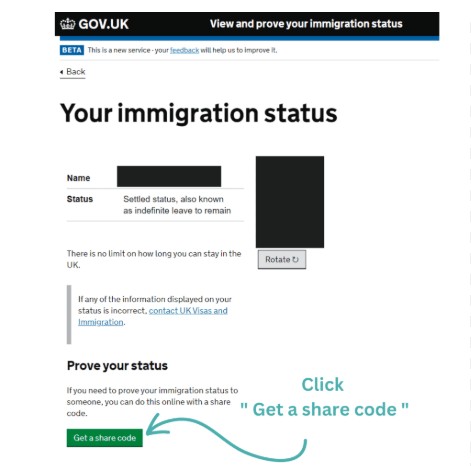
- Click on “Get a share code” or “Prove your status”
- Select what you need to prove (right to work, right to rent, or general immigration status)
- The system will generate a unique 9-character code (letters and numbers)
- Note the expiry date of the share code (typically valid for 90 days)
Step 5: Share the Code with the Relevant Party
Provide your share code along with your:
- Date of birth
- Full name (as it appears on your visa)
The recipient (employer, landlord, etc.) will use these details to access your immigration status on the government website.

How Employers and Landlords Use Your Share Code
When you provide your share code, employers and landlords will:
- Visit www.gov.uk/view-right-to-work or www.gov.uk/check-tenant-right-to-rent-documents
- Enter your share code, date of birth, and surname
- View your immigration status and confirm your eligibility
- Keep a record of the check for their compliance purposes
This process is free for both you and the person checking your status.
Important Things to Know About Share Codes
Share Codes Expire
Share codes are typically valid for 90 days from the date of generation. After expiration, you’ll need to generate a new code if someone else needs to check your status.
Each Check Requires a New Code
For security reasons, it’s best practice to generate a fresh share code for each employer or organization that needs to verify your status.
Keep Your UKVI Account Details Safe
Your UKVI account credentials are sensitive. Never share your login details with anyone, including employers or landlords. They only need your share code, date of birth, and name.
You Can Generate Unlimited Codes
There’s no limit to how many share codes you can create, and the service is completely free.
Troubleshooting Common Issues
Can’t Access Your UKVI Account?
If you’re having trouble logging in:
- Use the “Forgotten your password?” link to reset your credentials
- Ensure you’re using the same email address or details from your visa application
- Contact the UKVI Resolution Centre if you still can’t access your account
Your Visa Isn’t Showing in Your Account?
This can happen if:
- You haven’t linked your visa decision to your UKVI account yet
- There’s a delay in the system updating (wait 24-48 hours after your decision)
- You created multiple accounts and are logged into the wrong one
The Share Code Isn’t Working?
Check that:
- The code hasn’t expired (90-day validity period)
- You’ve provided the exact date of birth and name as they appear on your visa
- The code has been entered correctly (letters and numbers are case-sensitive)
Tips for a Smooth Experience
Set up your UKVI account early: Don’t wait until you need a share code urgently. Create your account as soon as you receive your visa approval.
Save a screenshot: Keep a screenshot of your immigration status page for your personal records (but never share this publicly).
Generate codes in advance: If you have job interviews or property viewings scheduled, generate your share code a day or two before and have it ready.
Double-check expiry dates: Always note when your share code expires and generate a new one if needed.
Your Youth Mobility Visa Rights
With your Youth Mobility Visa, you have the right to:
- Work in most jobs in the UK (with some exceptions for professional sportspeople and doctors/dentists in training)
- Study if you wish
- Travel in and out of the UK freely
- Bring dependants (in some circumstances, check your specific visa conditions)
Your share code proves all of these rights to anyone who needs to verify your status.

Final Thoughts
Generating a share code for your UK Youth Mobility Visa is a straightforward process that typically takes just a few minutes. By understanding how the system works and setting up your UKVI account early, you’ll be well-prepared to prove your immigration status whenever needed during your UK adventure.
Remember, the share code system is designed to make things easier and more secure for everyone involved. Keep your UKVI login details safe, generate fresh codes when needed, and enjoy your time living and working in the United Kingdom.